
Android 17 Virtual Gamepad: How a Foldable Phone Becomes a Handheld Console
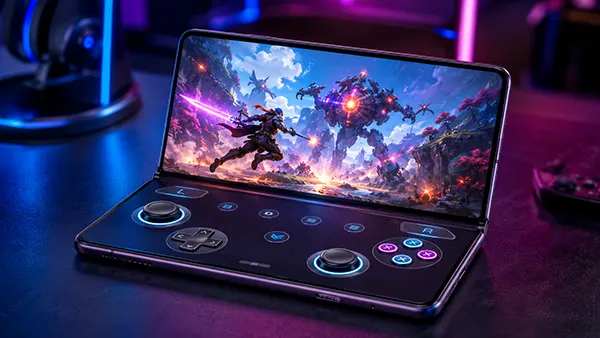
Android 17 gives foldable phones a more convincing role as portable gaming devices by separating the game from its controls. The new foldable gaming mode places gameplay on the upper half of the internal display and turns the lower half into a virtual gamepad. That arrangement resembles a dual-screen handheld console, but it works with the hardware already inside the phone. The idea is simple: players gain a clear view of the action without touch buttons covering important parts of the screen, while the phone remains compact enough to carry every day. The feature is promising, although its 2026 rollout is gradual rather than universal.
How Android 17 Changes Gaming on Foldable Phones
Google released Android 17 on 16 June 2026 for most supported Pixel devices, with other eligible Android phones due to receive it during 2026. Foldable gaming mode is part of that release, but Google has stated that the feature will become available over the following months. This distinction matters. A foldable may already run Android 17 and still lack the virtual controller until a later system update arrives. Availability also depends on the manufacturer, because each brand can adapt the feature to its own screen dimensions, hinge design and software interface.
When the mode is active, the unfolded internal display uses an approximately 50/50 layout. The game occupies the upper section, while a dedicated controller fills the lower section. This prevents the usual problem of transparent touch buttons sitting over maps, enemies, menus or text. It also reduces the need to stretch both thumbs across a wide inner screen. On a book-style foldable, the result feels closer to using a small handheld console than holding a tablet-shaped phone with controls scattered across the picture.
The virtual gamepad does not imitate random taps on the screen. It sends the kind of button input that Android games normally receive from a physical controller. That approach improves compatibility with titles that already support standard gamepads and means developers do not need to create a special layout for every foldable model. Google has also introduced native controller remapping for external pads and says Android 17 improves memory management for demanding games, helping to reduce frame drops and short stutters. These additions support the same aim: making mobile play more consistent without requiring a bag of accessories.
What the Virtual Gamepad Includes
The control set is close to what players expect from a modern console pad. It includes a directional pad, two virtual analogue sticks, A, B, X and Y action buttons, a Start button and shoulder inputs labelled L1, L2, L3, R1, R2 and R3. This is enough for many action games, racing titles, role-playing games and streamed console releases that already recognise a controller. The wide range of inputs also prevents the lower screen from feeling like a simplified mobile overlay designed only for basic games.
Android 17 allows the layout to be adjusted for different hands and playing styles. Players can choose inline or staggered stick positions, alter the overall control size and switch between light and dark visual themes. These options are more important than they may first appear. Foldable phones vary considerably in width, thickness and hinge position, while players differ in grip and thumb reach. A layout that feels comfortable on one model may be tiring on another, so resizing and repositioning the controls can make the difference between a short test and a practical daily setup.
Haptic feedback can be enabled to give each press a small vibration, providing some confirmation on a smooth glass surface. It cannot reproduce the travel and resistance of real buttons, but it helps reduce missed inputs during slower games. The virtual pad can also be hidden when the full internal display is preferred. If a Bluetooth or USB-C controller is connected, Android is designed to remove the on-screen pad automatically and return more screen space to the game. This makes the foldable mode an alternative input method rather than a replacement for physical hardware.
How to Set Up and Use Foldable Gaming Mode
The first step is to confirm three separate points: the phone must be a compatible foldable, it must run Android 17, and its current software build must include foldable gaming mode. Checking only the Android version is not enough because Google is distributing the gaming feature after the main operating-system release. On Pixel devices, system updates are found under the usual software update section. Owners of Samsung, OnePlus, Honor, Oppo, Xiaomi and other foldables should rely on the update notes issued for their exact model, as schedules and feature names may differ.
Once the feature is present, the basic process is straightforward. Unfold the phone before or after opening a game that supports a physical controller. Android should offer the gaming layout, moving the game view to the upper half and presenting the virtual pad below. If it does not appear, the most likely causes are an unsupported game, an incomplete manufacturer rollout or a disabled gaming setting. Restarting the game after unfolding the device may also help, because some titles determine their screen layout only when they are launched.
Before starting a long session, spend a few minutes adjusting the sticks and buttons. Place the main action buttons where the right thumb rests naturally, then check whether the left stick and directional pad can be reached without changing grip. Test menu navigation as well as movement, because a game may accept controller input during play but still expect touch input on certain screens. Haptics are useful for confirmation, although turning them off may be preferable when conserving battery. A brief setup period is usually more effective than accepting the default arrangement on every device.
Which Games and Services Are Compatible
The key requirement is existing support for a standard Android controller. If a game already works with a Bluetooth or USB-C pad, the Android 17 virtual gamepad should be able to send the same type of commands. Games designed only around direct screen taps are a different case. The new mode does not automatically assign virtual buttons to arbitrary areas of the display, so it should not be treated as a universal key-mapping tool for every title in Google Play. Controller support remains the simplest compatibility check.
Cloud gaming and remote-play apps may also benefit when they accept ordinary Android gamepad input. In that situation, the upper screen can show the streamed console or PC game while the lower screen handles controls. Performance, however, still depends on the app, network connection, streaming resolution and the way each service handles virtual input. It is sensible to test the service before assuming that every menu, overlay and login screen can be controlled without touching the game view. Some apps mix controller navigation with occasional direct touch prompts.
Players should also separate foldable gaming mode from Android 17’s external-controller remapping. Remapping lets a user change what buttons on a connected physical pad do, while the foldable mode provides an on-screen controller on the phone itself. Neither feature guarantees support in a title that ignores gamepad commands completely. Third-party touch-mapping tools may still exist for such games, but they use a different method and may require broader permissions. The built-in option is most useful when the game already follows recognised controller standards.
Benefits, Limits and Buying Advice for 2026
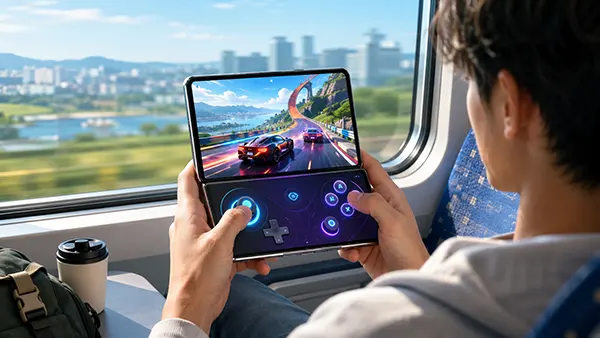
The clearest advantage is convenience. A foldable phone can provide a separate game view and control area without a clip, telescopic pad or stand. The upper display stays cleaner, the device can be opened almost anywhere, and players do not have to pair another accessory for a brief session. The layout also makes better use of the hinge, turning a design feature that normally divides the screen into part of the control scheme. For controller-friendly mobile games and short streaming sessions, this can make an expensive foldable feel more versatile.
There are practical limits. The game itself uses only half of the internal display, so text and interface elements may appear smaller than they do in full-screen mode. Glass controls offer no physical edges, trigger travel or true stick resistance, which can reduce precision in competitive shooters, fighting games and fast racing titles. Long sessions may also be affected by the phone’s weight, heat and battery use. A foldable is still a general-purpose phone with a large screen, not a dedicated gaming machine with active cooling, replaceable controls and console-style grips.
Buying decisions should therefore be based on confirmed support rather than a promised update. Android 17 is already available on supported Pixel hardware, but foldable gaming mode is being added over time, and other manufacturers can change its appearance or release schedule. Before paying for a particular model, check its official update notes, the games you actually use and the comfort of holding it half open. The feature adds value to a foldable that already suits your needs, but it is not a strong reason to replace a reliable phone before compatibility has been verified.
Who Will Get the Most Value From It
The best match is a player who already wants a book-style foldable for reading, work, video and multitasking, and who also plays controller-compatible games several times a week. For that person, the virtual gamepad removes the need to carry a separate controller for every short journey. It is particularly useful for turn-based games, role-playing titles, adventure games and slower action releases where clear screen separation matters more than split-second physical feedback. It can also serve as a convenient backup when a normal controller is at home.
Competitive players may still prefer a dedicated pad. Physical sticks and triggers provide more accurate movement, faster repeated presses and a grip designed for long sessions. The virtual layout is better viewed as a portable compromise: cleaner and more organised than ordinary touch overlays, but less precise than real controls. Its value will also vary with hand size and phone shape. A wide foldable can provide generous button spacing, while a narrow or heavy model may become uncomfortable even when the software layout is well designed.
Android 17 does not turn every foldable into a full console replacement, but it gives the category a more purposeful gaming design. The strongest part of the idea is not raw performance; it is the way the operating system uses the two halves of the device for separate jobs. As the feature reaches more models during 2026, its usefulness will depend on manufacturer support, game compatibility and real comfort over time. For owners of a suitable foldable, the virtual gamepad can make spontaneous play easier while leaving the option of a physical controller available for demanding sessions.